PC Creator - PC Building Simulator Game Details
Title: PC Creator - PC Building Simulator
Genre: Simulation
Developer: CREATY
Publisher: CREATY
Release Date: 14 December 2021
Store: Steam
Game Releasers: P2P
About PC Creator - PC Building Simulator Game
**Build your dream PC, complete repair jobs, and grow your tech empire with over 200 real components in the immersive *PC Creator* simulator!**
Embark on an immersive journey into the digital realm of PC construction and maintenance with "PC Creator - PC Building Simulator Game," a meticulously crafted simulation experience designed to transform you into a virtual hardware maestro. This game plunges players directly into the intricate world of personal computing, offering a sandbox where the only limits are the bounds of your own ingenuity and understanding of component compatibility. From the moment you boot up your virtual workstation, you are presented with a compelling array of challenges and opportunities, all centered around the fascinating art and science of building, repairing, and optimizing computer systems. The core appeal lies in its dedication to realism, meticulously simulating the process of selecting individual parts, piecing them together with precision, and bringing a fully functional machine to life, all within the confines of a highly engaging digital environment.
The fundamental gameplay loop revolves around fulfilling diverse client requests, each presenting a unique configuration puzzle or a pressing technical malfunction that requires your expert attention. These assignments range from the straightforward task of assembling a budget-friendly office PC to the complex endeavor of engineering a high-end gaming rig capable of running the latest virtual blockbusters at maximum settings. Beyond mere assembly, the game demands a comprehensive understanding of system architecture. You will be tasked with diagnosing cryptic hardware failures, replacing faulty memory modules or power supplies, and crucially, ensuring that every installed Operating System and piece of software functions harmoniously with the underlying hardware. Successfully navigating these tiers of complexity is the key to progressing, earning the vital experience points and virtual currency necessary to expand your burgeoning enterprise. This progression system acts as a powerful motivator, constantly pushing players to tackle more demanding jobs and refine their diagnostic and building expertise.
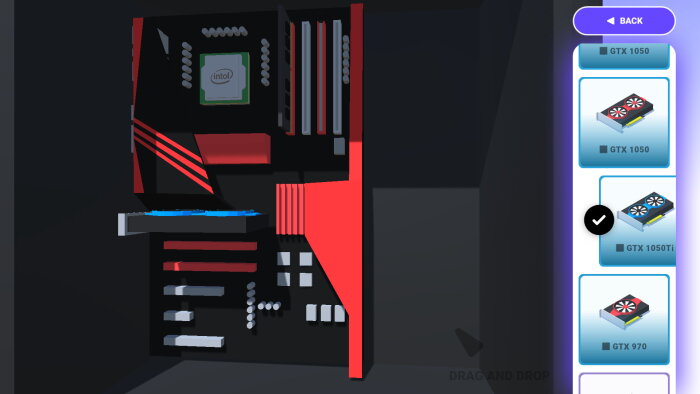
One of the standout features of "PC Creator" is the staggering depth of its component library. Boasting over 200 real-world inspired components, the simulation provides an expansive palette from which to draw when designing a system. This isn't just about plugging in generic parts; it involves making informed decisions regarding specific models of motherboards, the nuanced differences between various processor architectures, the thermal design power (TDP) implications of different cooling solutions, and the critical role of power supply wattage. Players quickly learn that simply acquiring the most expensive parts does not guarantee success. True mastery comes from understanding synergy—ensuring, for instance, that a chosen Central Processing Unit is appropriately paired with a compatible chipset on the motherboard, or that a powerful Graphics Processing Unit receives stable, sufficient power from the chosen electrical unit. This attention to detail in component selection is what elevates the game from a simple assembly exercise to a genuine educational tool disguised as entertainment. Furthermore, the game tantalizingly offers the ability to digitally “boost” or overclock select components, introducing a layer of risk versus reward as players push hardware beyond its factory specifications in pursuit of peak performance metrics.
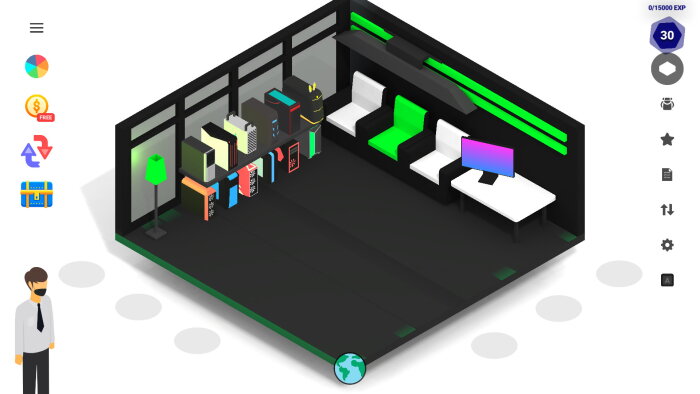
The management aspect of your growing PC empire is as engaging as the building itself. Initial operations might be confined to a small, cramped corner, but as you successfully complete orders, the accumulated virtual capital allows for significant business expansion. This includes purchasing entirely new, larger workshop spaces, each offering more room for intricate builds and specialized testing stations. Crucially, upgrading your workshop also means upgrading your tools—replacing rudimentary diagnostic equipment with state-of-the-art diagnostic benches and advanced soldering stations. This tangible representation of business growth reinforces the player’s efforts, providing a satisfying visual and functional reward for their competency in the field. The ability to customize and modernize the repair service center creates a secondary, persistent goal that runs parallel to the immediate client orders, fostering long-term investment in the game world.
A significant educational benefit woven into the fabric of "PC Creator" is the practical knowledge imparted regarding compatibility and system requirements. Novice builders will inevitably run into frustrating scenarios where physically installed components simply refuse to cooperate—an issue often flagged by the game’s internal validation system. These moments are crucial learning opportunities, forcing the player to delve into specifications, perhaps realizing that an older motherboard lacks the necessary socket type for a modern CPU, or that the chosen Random Access Memory's speed is being bottlenecked by the system's overall architecture. This iterative process of trial, failure, and subsequent research mirrors the real-world experience of PC building, effectively teaching best practices for creating optimized systems tailored for specific use cases, whether that be high-frame-rate gaming, intense computational rendering, intricate video editing workflows, or specialized business applications.
The simulation extends beyond mere physical construction into the realm of software deployment, offering a remarkably accurate portrayal of modern operating system installation. Players are given the freedom to install simulations of industry-standard operating systems, including various iterations of Windows, the flexible environment of Linux distributions, and the polished interface of macOS simulations. The process is intentionally designed to mimic reality: configuring boot sequences, partitioning virtual hard drives, and meticulously installing necessary device drivers post-OS installation. Mastering this software layer is critical, as a perfectly built machine is useless without the correct drivers enabling all of its advanced hardware features to function optimally. This software simulation provides a safe space to practice complex digital procedures that might otherwise be intimidating to attempt on a physical machine.
Adding another layer of depth to the simulation meta-game, "PC Creator" introduces the fascinating and volatile world of cryptocurrency mining. Players can dedicate resources and workshop space to constructing specialized mining farms, selecting powerful Graphics Processing Units specifically optimized for hashing algorithms. This introduces elements of market awareness and resource management, as the profitability of mining operations can fluctuate, requiring the builder to constantly monitor virtual market conditions, adjust component efficiency via tuning, and decide when to sell mined currency or reinvest profits back into the business infrastructure. This feature offers a distinct path for generating revenue, appealing to players interested in the financial and technical intricacies of digital asset creation.
Finally, the game fosters a strong sense of community and shared exploration. Recognizing that even the most detailed simulation can present unique, unforeseen challenges, developers have cultivated an official community space, often accessible via platforms like Discord. This active forum serves as a vibrant hub where builders can exchange tips, showcase their most impressive custom builds, debate the merits of competing hardware, and collectively troubleshoot complex technical issues that might arise during intensive gameplay. This collaborative environment transforms the solitary experience of simulation into a shared hobby, ensuring that players always have a resource pool to draw from, thereby enhancing longevity and engagement with the nuanced world of virtual PC creation. The developers are also noted for actively soliciting feedback from this community, illustrating a commitment to refining and improving the virtual building environment based on the collective experience of its dedicated player base.
PC Creator - PC Building Simulator Key Features
- Unleash your inner tech guru and build your dream machine with over 200 real components!
- Master the art of PC building and repair by tackling diverse client orders!
- Transform your humble setup into a booming computer shop empire!
- Dive into a stylish, modern, and incredibly user-friendly game interface!
- Design and assemble cutting-edge PCs from the ground up!
- Experience a massive selection of the latest motherboards, GPUs, CPUs, and more!
- Boost your components to insane levels for ultimate performance gains!
- Upgrade your workshop with new rooms and state-of-the-art equipment!
- Learn the secrets of PC compatibility and optimization by trial and error!
- Virtually install and troubleshoot popular operating systems like Windows, Linux, and macOS!
- Test your creations by installing and playing actual programs and games within the game!
- Join a vibrant community on Discord for tips, contests, and game improvement suggestions!
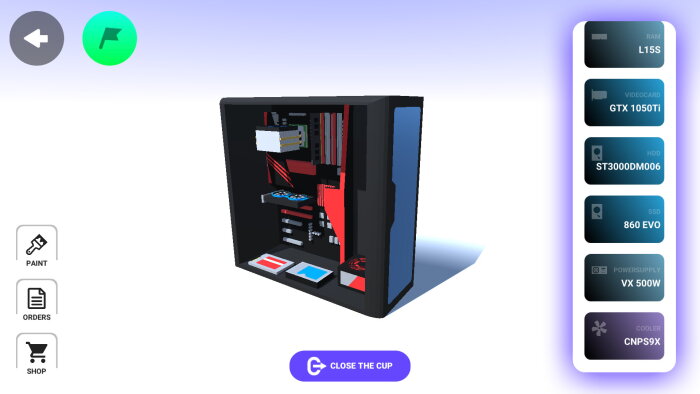
PC Creator - PC Building Simulator Gameplay
Download Links for PC Creator - PC Building Simulator
Download PC.Creator.PC.Building.Simulator.v10224427
Mega
PC.Creator.PC.Building.Simulator.v10224427.zip
1fichier
PC.Creator.PC.Building.Simulator.v10224427.zip
Pixeldrain
PC.Creator.PC.Building.Simulator.v10224427.zip
Mediafire
PC.Creator.PC.Building.Simulator.v10224427.zip
Gofile
PC.Creator.PC.Building.Simulator.v10224427.zip
Ranoz
PC.Creator.PC.Building.Simulator.v10224427.zip
Drop
PC.Creator.PC.Building.Simulator.v10224427.zip
Bowfile
PC.Creator.PC.Building.Simulator.v10224427.zip
Frdl
PC.Creator.PC.Building.Simulator.v10224427.zip
Wdfiles
PC.Creator.PC.Building.Simulator.v10224427.zip
Mixdrop
PC.Creator.PC.Building.Simulator.v10224427.zip
Chomikuj
PC.Creator.PC.Building.Simulator.v10224427.zip
Vikingfile
PC.Creator.PC.Building.Simulator.v10224427.zip
Down mdiaload
PC.Creator.PC.Building.Simulator.v10224427.zip
Hexload
PC.Creator.PC.Building.Simulator.v10224427.zip
1cloudfile
PC.Creator.PC.Building.Simulator.v10224427.zip
Usersdrive
PC.Creator.PC.Building.Simulator.v10224427.zip
Krakenfiles
PC.Creator.PC.Building.Simulator.v10224427.zip
Megaup
PC.Creator.PC.Building.Simulator.v10224427.zip
Clicknupload
PC.Creator.PC.Building.Simulator.v10224427.zip
Dailyuploads
PC.Creator.PC.Building.Simulator.v10224427.zip
Ddownload
PC.Creator.PC.Building.Simulator.v10224427.zip
Rapidgator
PC.Creator.PC.Building.Simulator.v10224427.zip
Nitroflare
PC.Creator.PC.Building.Simulator.v10224427.zip
Turbobit
PC.Creator.PC.Building.Simulator.v10224427.zip
System Requirements for PC Creator - PC Building Simulator
PC Creator - PC Building Simulator has modest system requirements, needing at least a 1.8 GHz Single Core processor, 2 GB of RAM, and a graphics card with hardware acceleration and dedicated memory to run, along with 1 GB of available storage space; for a more optimal experience, the developers recommend upgrading to a 2.4 GHz Single Core processor, doubling the memory to 4 GB of RAM, and ensuring 2 GB of free storage space, with the operating system requirement being flexible across Microsoft Windows Vista, XP, 7, or 10 for both minimum and recommended setups.
Minimum:- OS *: Microsoft® Windows Vista®/XP®/Windows® 7/Windows® 10
- Processor: 1.8 GHz Single Core
- Memory: 2 GB RAM
- Graphics: Hardware Accelerated Graphics with dedicated memory
- Storage: 1 GB available space
- OS *: Microsoft® Windows Vista®/XP®/Windows® 7/Windows® 10
- Processor: 2.4 GHz Single Core
- Memory: 4 GB RAM
- Graphics: Hardware Accelerated Graphics with dedicated memory
- Storage: 2 GB available space
How to Download PC Creator - PC Building Simulator PC Game
1. Extract Release
2. Launch The Game
3. Play!